
PLATFORM · Office Action Shells
Office Action Shells
Preparing U.S. Patent Office Action responses is time-consuming and resource intensive. Before any technical arguments are written, a valuable team member must retrieve the office action, assemble the cited prior art, set up the response document, and prepare the client and transmittal correspondence around it. That preparation consumes attorney and paralegal time on every case.
Response shells
in minutes
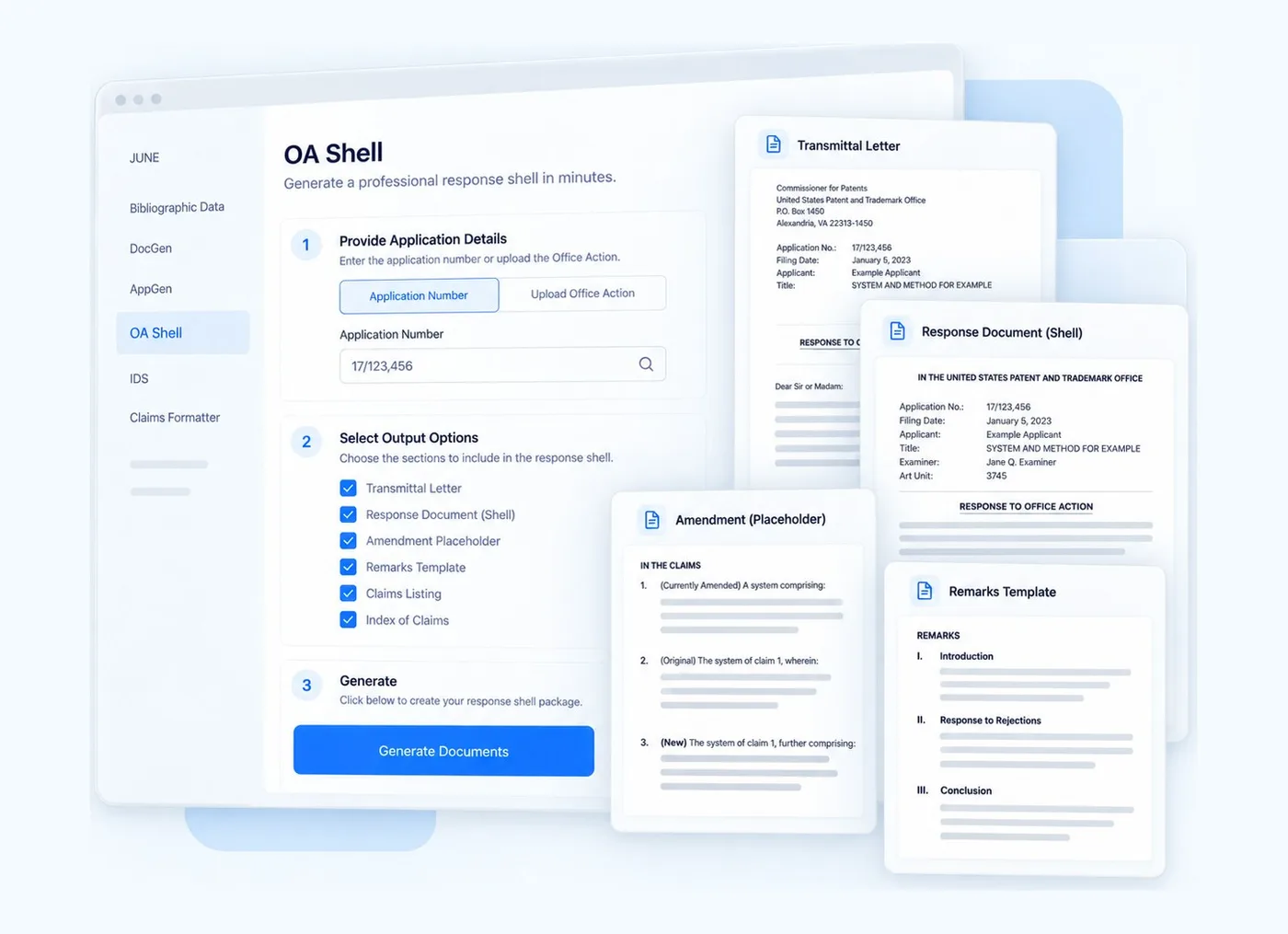
Trexo’s Office Action Shells module automates that groundwork. It downloads USPTO-issued office actions for your cases and prepares response shells from customizable templates aligned to your practice and client requirements, so attorneys open a prepared document and fill in the technical arguments rather than building the response from scratch.
Key capabilities
Automated Office Action retrieval
Customized response shell preparation
Cited prior art collection
Built-in claims formatting and cleanup
Complete response package preparation
KEY ADVANTAGES
What Office Action Shells changes
Faster response preparation
Lower prosecution costs
Greater consistency and accuracy
More efficient prosecution workflows
Who it’s for
- IP law firms
- Corporate prosecution teams
- Paralegal teams
- IP operations teams
- Life sciences companies
Every shell arrives
docket-ready
The system monitors USPTO correspondence, pulls the office action and its cited art, and assembles a response shell against your firm’s own template.
- Fully customised Office Action response shell
- All cited patent prior art attached
- Draft client letter template
- Transmittal letter, where the attorney uses one
Hours of assembly become
minutes of review.
Attorneys should be reasoning about claims, not collecting references and reformatting documents.
INTEGRATION
Matched to your
house style
Templates are fully customisable to your practice’s formatting conventions and to individual client requirements, so shells arrive looking like your work product.
HOW IT WORKS
From office action to response shell
Office Action Shells in four moves, before the attorney starts writing.
- 01
Office action arrives
The USPTO office action is downloaded automatically, without manual retrieval.
- 02
Shell is prepared
A fully customised response shell is built to your practice and client requirements.
- 03
Prior art and letters attached
All cited patent prior art, a draft client letter and, where used, a transmittal letter.
- 04
Attorney responds
The attorney works from the shell to the argument, not from a blank page.
COMMONLY ASKED QUESTIONS
About Office Action Shells
What is the Office Action Shells module?
The Office Action Shells module is Trexo's technology solution for preparing Office Action response shells. It automatically retrieves the office action, assembles the cited prior art, and prepares a templated response document so attorneys can go straight to the technical arguments.
How does the Office Action Shells module get the office action?
It automatically downloads USPTO-issued office actions for your cases, so the rejection does not have to be located and uploaded by hand before a shell can be prepared.
What is included in a response shell package?
A fully customized response shell, all cited patent prior art, a draft client letter template, and a transmittal letter where the attorney uses one.
Can the response templates be customized?
Yes. Templates are fully customizable to align with your practice needs and client-specific requirements, so every shell follows your requirements from the start.
What does the claims formatter do?
It updates claim status identifiers, flags preamble inconsistencies, removes strikethroughs and bracketed text, and preserves clean claim content without underlines, giving the attorney a tidy claim set to work from.
Does the Office Action Shells module write the substantive response?
No. It prepares everything around the argument. The technical and legal arguments stay with your attorneys.
How long does it take to create a shell?
Response shells are created within minutes. The time saved goes back to attorneys and paralegals for higher-value work.
Talk to us about Office Action Shells
Tell us how your team works today and a specialist will come back to you within one business day.
MORE OF THE PLATFORM
Explore the other modules
- View
JUNE
AI-enabled IP Assistant, built to automate IP tasks
- View
PTO & Custom Forms
Generate accurate, compliant IP documents faster with intelligent templates and dynamic data.
- View
New Applications
Generate USPTO-ready patent application packages in minutes instead of hours.
- View
Docket Quality
Continuously identify IP data risks before they become filing, deadline, or compliance issues.

Ready to see it on your portfolio?
Contact us and we will walk through your workflow, not a generic script.